What is Campfire
Campfire is a Windows toolbox for Minecraft: Java Edition players. It unites remote multiplayer, a lobby, maps and launcher repair in a single program. It needs no installation, writes nothing to the registry, and runs on everything from Windows 7 SP1 to Windows 11.
Principles
Focused and lightweight. Campfire does a few things and does each of them thoroughly. The program needs no installer, and the networking component used for multiplayer is downloaded only on first use, with every file verified.
Launcher independent. Multiplayer works with the running game, not with a particular launcher. Whichever launcher and account type start the game, you can host or join a room. Other clients that speak the same multiplayer protocol can join the same rooms as Campfire users.
Transparent and verifiable. All of Campfire's source code is public. Every change it makes to a launcher is limited to clearly defined methods, verified in memory before anything is written, and always backed up. Remote content is limited to text and list data and can never alter settings or run programs; every network connection is documented in Network Security.
Features
Multiplayer
Once the host creates a room and enters a singleplayer world, Campfire opens it to LAN and creates an invite code. When friends join, the host's world appears in their LAN world list; a double-click takes them in, just as on a real local network.
- Players connect peer-to-peer whenever possible, and through relay nodes when networks are restrictive.
- Rooms can be published to the lobby for more players to discover and join.
- Inside the world, chat greets each player and the Tab list header and footer show the host, player count and latency live, on every release from 1.7.2 on.
- The host can see members and remove or block guests; guests can hide their IP address.
See Hosting and Joining and Lobby.
Maps
- Browse, search and download maps from CurseForge.
- On import, the map's game version is identified, the map is placed into an installed version that can open it, and upgrade risks are flagged; a room can be created straight afterwards.
See Maps.
Tools
- Launcher repair restores game downloads, loader installation and modpack installation that a launcher has switched off, and lifts region-based download locks. See Launcher Repair.
- JRE Tool lifts a launcher's default block on JREs, so a JRE can start the game just like a JDK. See JRE Tool.
Experience
- Light and dark modes, with a chosen color, the Windows accent color or colors taken from your wallpaper, in six palette styles.
- Carefully tuned transitions for pages, dialogs and controls, which can be turned off at any time.
- A notification area icon shows the multiplayer status live, and the room stays open after the window is closed.
- Simplified Chinese and English, following the system language by default.
A quick tour
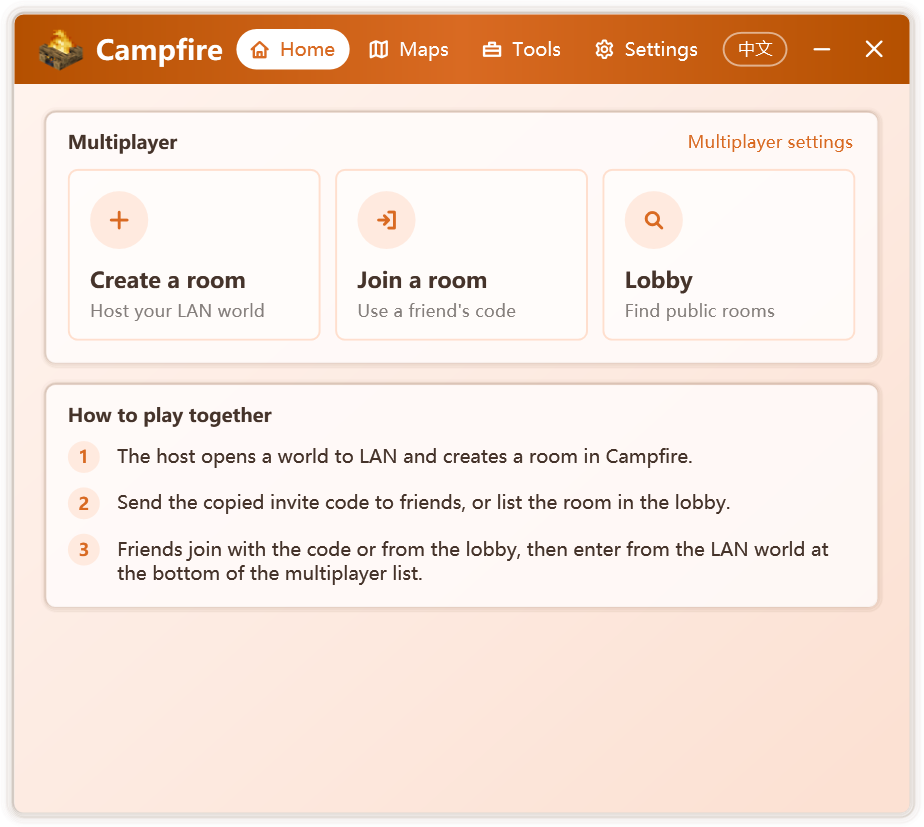
The window has four tabs:
| Tab | Contents |
|---|---|
| Home | Create a room, join a room and the lobby, the current room status and a short how-to |
| Maps | Browse and download CurseForge maps, import local maps |
| Tools | Launcher Repair Tool and JRE Tool; a red dot appears when a repairable launcher is found |
| Settings | Personalize, General, About and Licenses |
On first start, a short tour introduces these areas. You can replay it from Settings › About.
Open source
Campfire is a free, open-source community project hosted on GitHub. Third-party components and their licenses are listed in Settings › Licenses. Campfire is not affiliated with Mojang Studios or Microsoft.